We Need App Testers
Test The Doing The Damage Mobile App
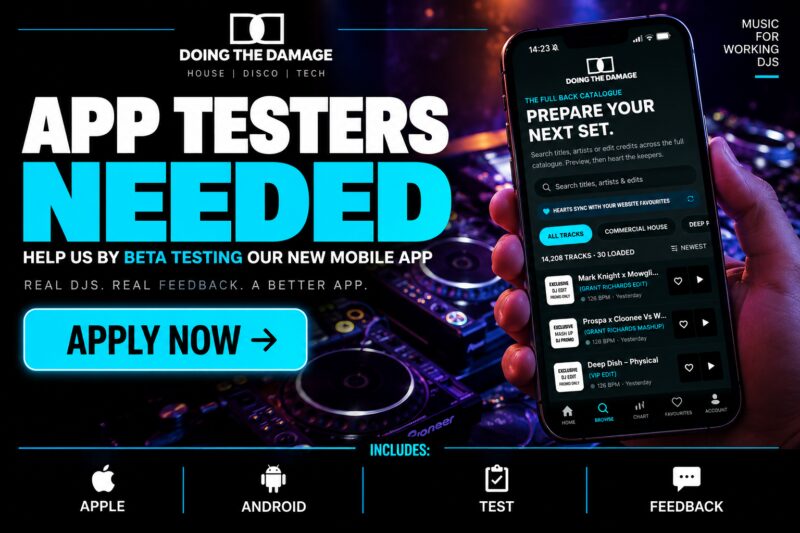
We’re inviting existing DTD members to test our new mobile app before its full public release.
Preview tracks on the move, search the back catalogue, explore the Top 10 Charts and save your favourites. Then download your chosen tracks from the DTD website when you’re back at your laptop or desktop.
This is an early test version, so you may encounter bugs or see changes as we improve it. You don’t need technical experience to help, just a compatible phone and a willingness to share honest feedback!
Register your interest
Please email the DTD team on- help@doingthedamage.com
- With your name and DTD account email.
- Whether you use Android or iPhone.
- Your phone’s make and model.
- Your Android or iOS version.
- Android: the Google account email signed into your phone’s Play Store.
- iPhone: an email address where you can receive and open your TestFlight invitation.
Your store invitation email can be different from your DTD membership email.
Never send us your password or verification codes. Please register your details via email, not in public comments.
We’ll contact selected testers with their invitation and installation instructions.
Android testers
What you need
- An Android phone running Android 7.0 or newer.
- Google Play Store installed and working.
- A Google account signed into the Play Store.
- An active DTD membership and an internet connection.
To check your Android version, look under Settings → About phone → Android version. The exact wording varies between phones.
To find your Google Play email, open the Play Store and tap your profile picture at the top right.
You do not need a developer account, the Play Console app, or to change your phone’s security settings.
Installing the app
- Register your interest and wait for confirmation that you have been added.
- Open the private testing link we send you.
- Make sure the link opens under the same Google account email you supplied.
- Select the option to join or become a tester.
- Follow the Google Play download link and install Doing The Damage.
- Open DTD and sign in using your normal DTD email or username and password.
The invitation link is important: you may not find the private app by searching the Play Store.
During the test
Please remain enrolled for at least 14 consecutive days after joining the closed test. Keep the app installed, try it regularly and send us feedback.
You don’t need to leave the app open all day. We want genuine use across the testing period.
Install updates through Google Play when available. Please don’t select “Leave the programme” during the agreed testing period unless you need to withdraw.
If installation doesn’t work
- “App not available” or no access: check that both your browser and Play Store are using the email you registered with.
- Device incompatible: send us your phone model and Android version. Don’t buy another phone or change its software just to join.
- Already have an earlier DTD test app: tell us before uninstalling it if the Play Store update fails.
- Still stuck: send a screenshot of the message, without any passwords or personal information.
iPhone testers
What you need
- An iPhone running iOS 16.4 or newer.
- Access to the App Store with your Apple Account.
- Apple’s free TestFlight app.
- An active DTD membership and an internet connection.
Check your phone model and iOS version under Settings → General → About.
You don’t need a paid Apple Developer account, a Mac, Transporter or Developer Mode.
Installing the app
- Register your interest and wait for your invitation.
- Install TestFlight from the App Store.
- On your iPhone, open the invitation email and select View in TestFlight.
- Accept the invitation and install Doing The Damage.
- Open DTD and sign in with your normal DTD email or username and password.
Please wait for your invitation rather than searching the App Store for DTD—the public app isn’t available yet.
Updates and feedback
Open TestFlight to check for DTD updates, or enable automatic updates there.
You can report problems through Send Beta Feedback in TestFlight. You can also contact the DTD team directly with screenshots and a description.
TestFlight builds expire. If a build expires, check TestFlight for a replacement rather than deleting your DTD account.
If installation doesn’t work
- Check your junk or spam folder for the invitation.
- Make sure TestFlight is installed and your iPhone meets the iOS requirement.
- If the invitation says the build is unavailable or expired, contact us.
- Send a screenshot of any error message, but never include passwords or verification codes.
What we’d like everyone to test
Please try the following over several sessions:
- Opening and signing in: does the app launch smoothly, and can you log in with your normal DTD details?
- Browsing: check the latest tracks and switch between genres.
- Searching: search for titles, artists and edit credits—including older tracks you know are on the website.
- Playback: tap a track’s artwork or title. It should play in the top player without opening a separate track page.
- Player controls: try play, pause, seeking and switching tracks.
- Favourites: heart a track, then check that it appears in your website favourites. Try the reverse too.
- Top 10 Charts: check the overall chart and individual genres.
- Layout: tell us about cut-off words, overlapping controls or buttons that are difficult to tap.
- Everyday use: try headphones or Bluetooth, locking the screen and returning to the app. Report anything unexpected.
Favourites sync with your real DTD account. Adding or removing a heart during testing will also affect your website favourites.
The app is for previewing and preparing your selections. Music downloads are made from the website on your laptop or desktop—not from the phone app.
How to send a useful bug report
Please include:
- Phone model and Android/iOS version.
- DTD app version or build number, if visible.
- What you were doing.
- What you expected to happen.
- What actually happened.
- Track title or search phrase, if relevant.
- A screenshot or short screen recording, where possible.
- Whether it happens every time or only occasionally.
Please hide passwords and personal information before sending screenshots.
Thanks for helping us get the DTD app ready for our members!